A technical CCTV investigation report connects the examination to the people who must use its results. It should show what was requested, which material was examined, what the analyst did, what was found, and where the limits lie. Without those links, technically correct work can still be difficult to review or apply.
The report is not a printout from a forensic tool. Screenshots, media-information files and automated logs may support the work, but they rarely explain the full scope or the reasoning behind the result. The analyst remains responsible for the narrative.
The current SWGDE best practices for digital forensic video analysis state that examination steps and clarification techniques should be documented so another comparably trained analyst can understand the process and obtain comparable information. Results, and opinions when applicable, belong in the analyst report.
Start with the question and control the scope
State the purpose in one or two sentences before describing tools or findings. The task may be to clarify a sequence, locate a person or vehicle within a defined period, compare timestamps, extract representative frames, assess technical file properties or create a viewing copy. “Analyse the CCTV” is not a useful scope.
Record the limits as well as the request. If only three cameras and twenty minutes were reviewed, do not imply that the entire system or day was examined. If the task expands, record the revised scope and approval under the applicable procedure.
Write from contemporaneous notes, not memory
Contemporaneous notes are made during the work or as soon as practical afterwards. Record evidence handling, tools and versions, significant settings, observations, failed attempts, decisions and output locations. Photographs, screenshots and tool logs can form part of the record when their purpose and source are clear.
Draft the report from those notes rather than reconstructing a workflow days later. The final text may summarise routine actions, but the case record must retain enough detail for review. CCTV Collector’s structured workflow can keep system details, photographs, time checks and acquisition notes together while the video stays in approved storage.
Identify the request and every item examined
Identify the requester, task or case reference, request date and each submitted or collected item. An item may be a recorder export folder, USB drive, optical disc, disk image, cloud download, proprietary player package or derivative supplied for further work.
- Record a unique item identifier, source and date received or collected.
- Describe the media or package clearly enough to distinguish it from every other item.
- Preserve original filenames and folder relationships in native CCTV exports.
- Record relevant hash values, file sizes or other integrity identifiers when available.
- State whether the examined material was native, a verified working copy or a derivative.
A native export is produced directly by the recorder or video management system. A working copy is a verified copy used for examination. A derivative is a new output, such as a transcoded clip, clarified video or extracted still. Keep those roles distinct.
Make the time basis and file relationships explicit
A timestamp has little value unless the reader knows which clock it represents. State whether times are recorder display time, exported-player time, local reference time or Coordinated Universal Time (UTC). Record time zone, daylight-saving status and any measured recorder offset. Do not apply a current offset to historical footage as if it were certain when clock drift is unknown.
For multi-camera material, explain how channel labels, filenames and physical views relate. Record gaps, overlapping segments and the time basis used in timelines. A compact table is often clearer than several pages of prose.
Describe methods at the right level
A technically competent reviewer should understand what was done without reading a software manual. Name the principal software and version, identify important inputs and outputs, and describe operations that materially affected interpretation. Routine interface clicks can remain in the notes unless they are needed to reproduce a critical result.
“Video was enhanced” is too vague. State, for example, that a defined segment was decoded, deinterlaced, resized with a named method, adjusted for brightness and contrast, and exported as a specific derivative. Deinterlacing converts interlaced fields into viewable frames; resizing changes image dimensions and may change the appearance of detail. Also record stabilization, frame averaging, sharpening, noise reduction or aspect-ratio correction when used.
Document the steps that matter to the result. The reader should not have to guess which file was processed, which settings were used, or whether an output is native or derived.
If a method departs from the organisation’s standard operating procedure (SOP), disclose the deviation and reason. An SOP is an approved description of recurring work. A documented deviation can be reviewed; a hidden one cannot.
Separate observations, results, interpretations and opinions
An observation is directly visible or measurable: a vehicle enters the frame, a timestamp changes or a segment fails to decode. A result is the outcome of a defined examination, such as a corrected timeline or extracted frame set. An interpretation explains what the result means in context. An opinion answers a question using specialist expertise.
Keep those levels distinct. “A light-coloured vehicle is visible” is not the same as “the vehicle is white”, and neither identifies a particular vehicle. Compression, infrared illumination, exposure and viewing angle can alter apparent colour and shape. Use precise language and state the basis for an opinion.
When the material cannot support a reliable answer, “inconclusive” may be correct. Quantitative findings may need a tolerance or margin of error when frame timing, compression or image geometry limits precision. Place uncertainty beside the affected finding rather than hiding it in a final disclaimer.
Document processing and every delivered derivative
Describe clarified videos, still images, charts and viewing copies as examination outputs. Record the parent item or segment, material processing steps, software, output format and purpose. If a compressed delivery format is used, note the choice and relevant consequence. Lossy compression reduces size by discarding information and can introduce artifacts.
State whether originals, working copies and derivatives were returned, retained, archived, transferred or destroyed according to procedure. The documentation features in CCTV Collector can support a structured PDF record of acquisition details, photographs and time verification; the app does not receive, play or analyse the footage.
State limitations where they affect the result
Limitations are part of the technical result. Explain which characteristics restrict the conclusion and how they were handled. Useful limitations are specific to the question.
- Low resolution, compression, motion blur, poor focus or clipped highlights.
- Unknown frame timing, missing segments, duplicate frames or playback irregularities.
- Occlusion, limited coverage, changing illumination or infrared colour shifts.
- An unverified recorder clock, uncertain daylight-saving setting or historical drift.
- Proprietary structures, unavailable player functions or incomplete metadata.
- Processing that improves visibility but cannot recover detail that was never recorded.
Avoid “image quality was poor” when a more useful statement is possible. Say whether the limitation affects identification, timing, colour, measurement or only presentation.
Use a predictable report structure
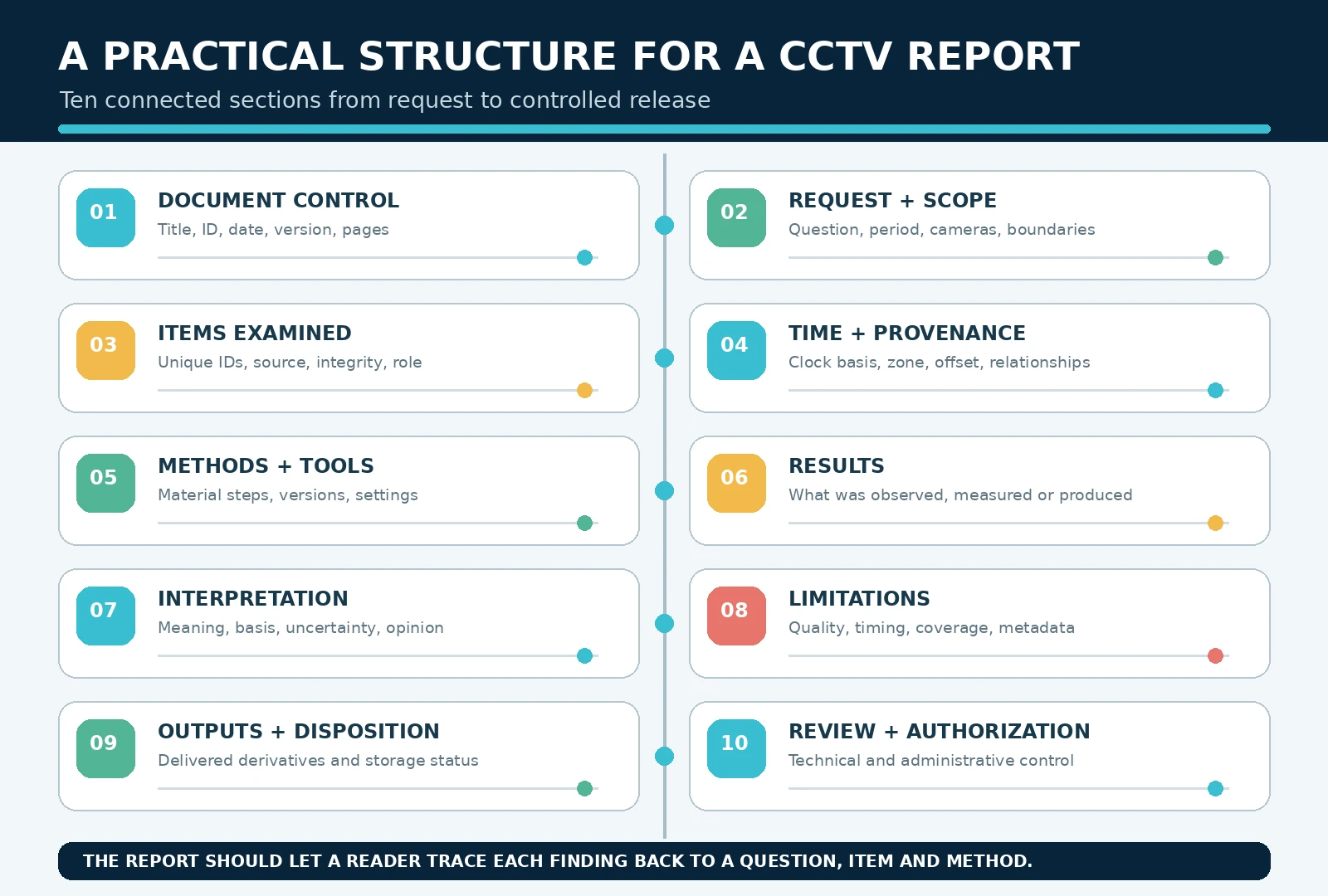
The SWGDE report-writing requirements define minimum elements rather than one mandatory layout. A consistent order makes review easier and reduces omissions.
| Report section | What to include | Purpose |
|---|---|---|
| Document control | Title, organisation, date, ID, version and pages. | Identifies the controlled report. |
| Request and scope | Requester, question, period, cameras and boundaries. | Defines what is answered. |
| Items examined | Unique IDs, source, dates, package and integrity data. | Links findings to material. |
| Time and provenance | Clock basis, zone, offset and file relationships. | Makes timelines understandable. |
| Methods and tools | Material steps, versions, settings and deviations. | Supports technical review. |
| Results | Factual outcomes, timelines, outputs and negative findings. | Answers the request. |
| Interpretation | Meaning, basis, uncertainty and opinions if required. | Separates expertise from fact. |
| Limitations | Relevant quality, timing, coverage and metadata constraints. | Prevents overstatement. |
| Outputs and disposition | Delivered files, parent links and storage/return status. | Accounts for products and items. |
| Review and authorization | Technical/admin review, author and approval. | Records quality control. |
Use figures, tables and appendices with purpose
Give every still image a unique label and identify its camera, source time and processing status. Describe crops and annotations, and retain the unannotated source. Put full hash lists, tool logs and long timelines in an appendix or supporting file, then summarise their significance in the report. Tool output supports the report; it does not replace the analyst’s explanation.
Build review into the report
Technical review asks whether methods, results and opinions are supported. Where required, a comparably trained reviewer should have access to the report, notes, representative source material and outputs. Administrative review checks identifiers, required fields, page control, distribution and procedural compliance. Record reviewer, date and outcome.
Control amendments and versions
Do not silently replace a released report. Issue an amendment that identifies and explains the change, references the original and carries a new version or date. Mark drafts clearly, retain required versions and prevent obsolete copies from being mistaken for the approved report.
Common CCTV reporting mistakes
- Leading with software instead of the question and scope.
- Listing files without linking them to an item, camera or period.
- Showing timestamps without time zone, reference clock or offset.
- Writing “enhanced” without describing material processing steps.
- Mixing direct observations with interpretation or identification.
- Omitting gaps, failed tests or negative findings relevant to the task.
- Attaching tool output without explaining its significance.
- Using generic limitations or delivering untraceable derivatives.
- Correcting a report without an amendment and version trail.
Practical pre-release checklist
- Confirm title, task/case ID, author, date and version.
- State the requester’s question and examination scope.
- Identify every item and link it to the reported results.
- Explain time basis, time zone, recorder offset and uncertainty.
- Record tools, versions, significant settings and methods.
- Separate observations, results, interpretations and opinions.
- Place specific limitations beside the findings they affect.
- Label all outputs, figures, tables and appendices.
- Record item and derivative disposition.
- Complete required technical and administrative review.
A clear report makes the technical work usable
The strongest CCTV report is not necessarily the longest. It lets a reader follow a clean line from the request, through the examined material and method, to the result and its limits. A specialist should be able to assess the work, while a non-specialist can understand the main finding without decoding raw software output.
Use a repeatable structure, write from contemporaneous notes, identify every item and clock basis, distinguish fact from interpretation, document processing and state uncertainty honestly. The report will then remain useful after the immediate task and software interface have changed.
Sources and further reading
- SWGDE 18-V-001-2.0: Best Practices for Digital Forensic Video Analysis, version 2.0 (12/10/2025)
- SWGDE 18-Q-002-1.0: Requirements for Report Writing in Digital and Multimedia Forensics, version 1.0 (11/20/2018)
- NIST SP 800-86: Guide to Integrating Forensic Techniques into Incident Response (August 2006)